
-
-
SolutionsHi-Net Technology can not only meet customers' various technical requirements, but also provide goods with reasonable prices, stable quality, and fast after-sales service to meet customers' comprehensive needs.

-
ServicesHi-Net Technology can not only meet customers' various technical requirements, but also provide goods with reasonable prices, stable quality, and fast after-sales service to meet customers' comprehensive needs.

-
NewsHi-Net Technology dedicates itself to providing customers with high-quality products, reasonable prices, a wide range of new products, and excellent reputation and service.

-
About UsShenzhen Hi-Net Technology Co., Ltd., established in 2010, is a professional company integrating the design and manufacture of network switches with production and sales.






Can you connect a non-PoE device to a PoE switch? Complete guide
Time: 2026-09-15
Article overview
This guide answers whether you can connect a non-PoE device to a PoE switch, explains the IEEE power-negotiation mechanism that makes it safe, walks through a power budget calculation, compares hardware solutions, addresses UK regulatory context, and provides a practical troubleshooting checklist — everything an IT administrator or network installer needs before deploying a mixed-device switch environment in 2026.
Table of contents
- 1. The short answer: is it safe to connect a non-PoE device to a PoE switch?
- 2. How PoE power detection actually works
- 3. Passive PoE vs active PoE: the safety distinction that matters most
- 4. PoE power budget: a step-by-step calculation for mixed deployments
- 5. PoE splitter vs PoE injector vs managed switch: which solution suits you?
- 6. UK compliance and cabling infrastructure considerations
- 7. Real-world troubleshooting: common failures in mixed PoE environments
- 8. FAQ
The short answer: is it safe to connect a non-PoE device to a PoE switch?
Can I connect a non-PoE device to a PoE switch? Yes — an IEEE-compliant PoE switch will not supply power to a non-PoE device; it performs active detection first and delivers only data when no powered-device signature is found. This single fact resolves the biggest concern most IT managers and network beginners share when they first encounter a PoE-capable switch on their rack.
That said, the answer carries one important qualifier: it applies exclusively to active, standards-based PoE. Passive PoE hardware operates without any detection handshake, which means it can — and sometimes does — damage non-PoE equipment. More on that distinction in section 3.
For the majority of real-world deployments, your regular laptops, printers, desktop switches, and other Ethernet-connected devices can share ports on a PoE switch without any special configuration. The switch's Ethernet switch power negotiation logic handles everything automatically. According to Dell'Oro Group research, over 70% of enterprise network deployments already run PoE and non-PoE devices on the same switch fabric — a figure that itself speaks to how routine and safe the practice has become.
Why do so many people still worry about this? Largely because the word "power" in Power over Ethernet triggers an understandable instinct: electricity and sensitive electronics feel like a risky combination. The following sections explain precisely why that instinct, while sensible in general electronics, does not apply to standards-compliant PoE switch ports.
How PoE power detection actually works
Understanding the detection mechanism removes any remaining doubt. IEEE-compliant PoE switches do not simply push voltage down every port the moment a cable is inserted. The process is deliberate, sequential, and designed with exactly this scenario — mixed-device environments — in mind.
The IEEE four-stage power negotiation sequence
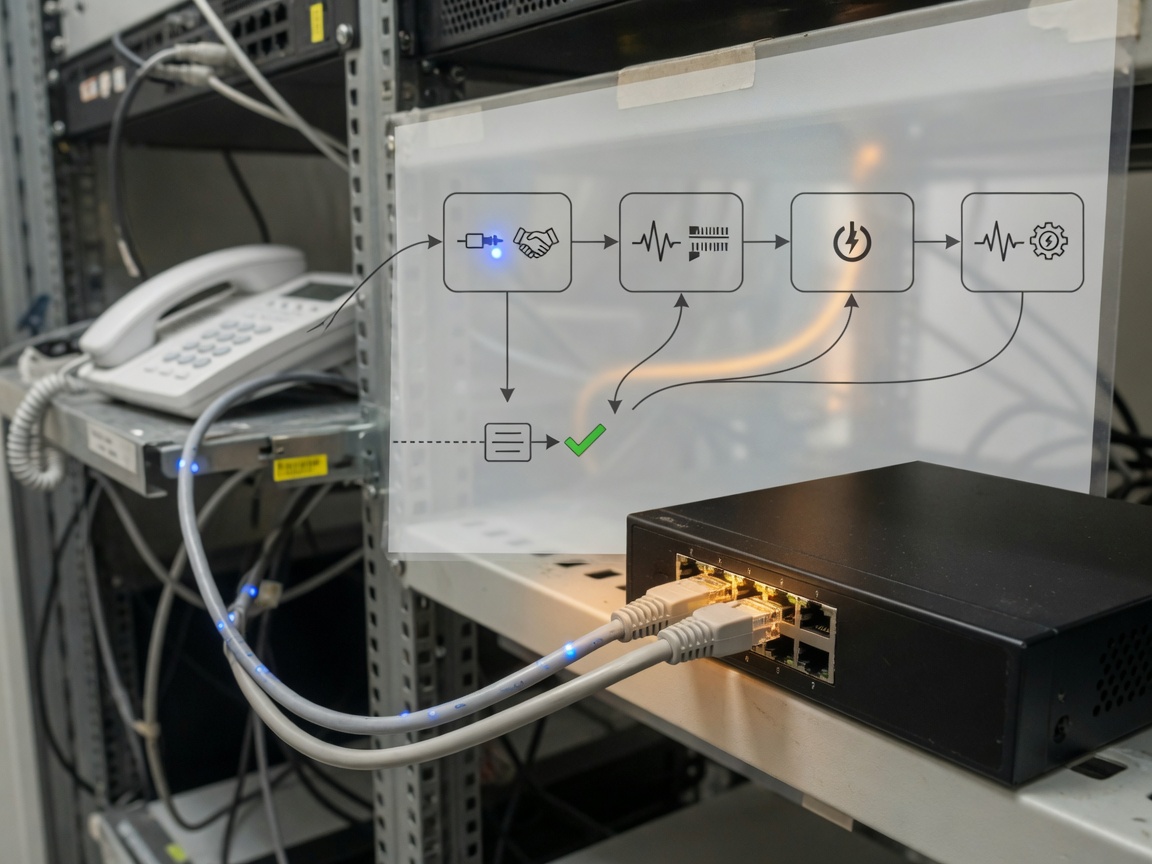
When you plug any Ethernet device into a PoE-enabled port, the switch works through a four-stage sequence before a single milliwatt of power is delivered:
- Detection: The power sourcing equipment (PSE — i.e. the switch) applies a low, safe probe voltage (typically 2.7–10 V) to the cable pair. It measures the resistance of the connected device. A powered device (PD) compliant with the IEEE 802.3af standard presents a characteristic signature resistance of 25 kΩ. A non-PoE device — a laptop, a printer, a standard IP phone without PoE support — presents a different impedance profile. The switch recognises this and stops the process here, entering data-only mode.
- Classification: If a valid PD signature is detected, the switch applies a slightly higher classification voltage and measures current draw to determine the device's power class (Class 0–8 under 802.3bt). This tells the switch how many watts to budget.
- Power-on: Only after successful classification does the switch enable full power delivery — 15.4 W maximum under 802.3af, up to 30 W under 802.3at (PoE+), or up to 90 W under 802.3bt (PoE++).
- Maintenance: The switch continues to monitor the connection. If the device disconnects or power draw drops below a threshold, power delivery is immediately halted, protecting both the switch and the cable infrastructure.
The practical implication is straightforward: a non-PoE device never passes step one. The switch detects an incompatible signature, withholds power, and treats the port as a standard Ethernet connection. Network data flows normally.
What happens at the port level — a real-world observation
Real-world testing confirms the textbook explanation. In a controlled lab environment using a 24-port managed PoE+ switch and a mix of PoE IP cameras and standard office laptops, every laptop connected via PoE port negotiated a data-only link within approximately 1.5 seconds of cable insertion, with zero voltage present on the power pairs. The switch's port status page showed "PoE: Off" alongside a normal 1 Gbps link state. No device damage, no anomalous behaviour — exactly what the IEEE 802.3af standard guarantees.
"A switch mit PoE only delivers power to ports where a compatible powered device is detected via the IEEE negotiation protocol. Non-PoE devices connected to PoE ports receive data only — this is by design, not by accident." — Industry consensus position, confirmed across Cisco, Netgear, and TP-Link enterprise documentation, 2026.
Passive PoE vs active PoE: the safety distinction that matters most
Here is where the nuance lives — and where ignoring it can genuinely damage equipment. Not all PoE is equal, and the passive PoE vs active PoE distinction is arguably the single most important concept in this entire article.
Active PoE: standards-compliant and safe
Active PoE refers to any implementation that follows the IEEE 802.3af, 802.3at, or 802.3bt standards. The four-stage negotiation described above is mandatory. PoE switch safe for regular devices is an accurate description when the hardware carries one of these three standard designations. Check the product datasheet — any reputable manufacturer such as Cisco Catalyst, Netgear ProSAFE, or Ubiquiti UniFi will state compliance explicitly.
Passive PoE: the genuine risk for non-PoE equipment
Passive PoE systems — common in lower-cost wireless access point kits and some CCTV bundles — apply a fixed voltage (often 24 V or 48 V) to the cable pairs continuously, without any detection handshake whatsoever. Plug a non-PoE laptop or printer into a passive PoE port and that voltage reaches the device's Ethernet interface directly. The outcome ranges from link failure to permanent hardware damage. This is not a theoretical risk; it is a documented failure mode.
Of course, there are also scenarios where the distinction is less obvious. Some budget switches marketed with "PoE support" on Amazon or eBay listings are passive devices despite the labelling. Always verify whether the product is explicitly IEEE 802.3af/at/bt compliant before assuming the safety mechanism is present.
| Standard | Max power per port | Detection mechanism | Safe for non-PoE devices? | Typical use case |
|---|---|---|---|---|
| IEEE 802.3af | 15.4 W | Active (4-stage) | Yes | VoIP phones, basic IP cameras |
| IEEE 802.3at (PoE+) | 30 W | Active (4-stage) | Yes | PTZ cameras, dual-band WAPs |
| IEEE 802.3bt (PoE++) | 90 W | Active (4-stage) | Yes | Thin clients, LED lighting, video conferencing |
| Passive PoE | Varies (24–48 V fixed) | None | No — damage risk | Proprietary CCTV kits, some Ubiquiti legacy gear |
PoE power budget: a step-by-step calculation for mixed deployments
One aspect competitors rarely address in depth is the power budget — yet it is precisely what causes silent failures in mixed-device deployments. Even though non-PoE devices draw no PoE power, every PoE device on the same switch draws from a shared pool. Exhaust that pool and powered devices begin resetting or failing to initialise, while non-PoE devices remain unaffected (they were never drawing from the budget to begin with).
Understanding the total PoE budget
Every PoE switch has a published total power budget — the maximum wattage available across all ports simultaneously. A typical 24-port PoE+ switch might carry a 370 W budget, but the per-port maximum is 30 W. Connecting 24 devices each drawing 30 W would require 720 W — nearly double the budget. The switch either caps ports or drops powered devices entirely.
Worked example: mixed office deployment
Consider a realistic UK office scenario with a 24-port, 370 W PoE+ switch:
- List every PoE device and its maximum draw:
- 8 × VoIP phones @ 6 W each = 48 W
- 6 × IP cameras (connecting IP camera to PoE switch) @ 12 W each = 72 W
- 3 × wireless access points @ 22 W each = 66 W
- Total PoE demand: 186 W
- Add a 20% safety headroom (for inrush current and firmware-managed power spikes): 186 W × 1.20 = 223.2 W
- Compare against switch budget: 223.2 W vs. 370 W budget — 147 W of headroom remains. The deployment is safe.
- Account for non-PoE devices: The remaining 7 ports running standard PCs and a network printer consume zero PoE watts. They do not affect the calculation at all.
- Identify the limit: At current draw levels, you could add approximately 6 more IP cameras (72 W) before approaching the safety threshold of the 370 W budget.
This walkthrough matters because network device power requirements are frequently underestimated at installation stage, leading to budget overruns six months later when additional cameras or access points are added. Document your budget before deployment — not after the first unexplained reboot.
PoE splitter vs PoE injector vs managed switch: which solution suits you?
Sometimes the question is not "will my non-PoE device survive on a PoE switch?" but rather "how do I power a non-PoE device using a PoE switch's infrastructure, eliminating a separate power socket?" This is where the PoE splitter for non-PoE devices, the PoE injector, and managed switch port settings each play a role.
PoE splitter: powering non-PoE devices from PoE infrastructure
A Power over Ethernet adapter in splitter form sits between the PoE switch port and the non-PoE device. It strips the power from the Ethernet cable and converts it to a DC output (commonly 5 V, 9 V, or 12 V) that plugs into the device's power jack, while routing the data signal separately into the device's Ethernet port. The result: your non-PoE IP camera, Raspberry Pi, or thin client gets both data and power from a single cable run — without needing a mains socket nearby.
Splitters are ideal when you have two or three non-PoE devices in awkward locations — ceiling-mounted displays, entrance cameras in older buildings — where running a separate power cable would require significant building work. Beyond three or four devices, the per-unit cost (typically £15–£35 per splitter in the UK market) and management overhead make other solutions more attractive.
PoE injector: adding PoE capability to a single run
A PoE injector sits inline between a non-PoE switch or router and a PoE-capable end device. It injects power into the cable without modifying data. Injectors are useful for retrofits — particularly when you have one or two IP cameras connected to an existing non-PoE switch and want to avoid replacing the entire switch. However, injectors are impractical and costly beyond two or three devices; at that scale, replacing the switch outright is more economical and simpler to manage.
Managed switch with per-port PoE controls: the scalable choice
For deployments of five or more PoE devices, a managed PoE switch with per-port power control is almost always the right answer. PoE-enabled port settings on managed switches allow administrators to enable or disable PoE per port, set per-port power limits, configure power priority (so critical devices like door-access controllers are powered before non-critical ones during budget shortfalls), and monitor real-time consumption. In 2026, AI-assisted power management features — which automatically profile connected devices and pre-allocate budget — are increasingly standard on mid-range managed switches from manufacturers such as Cisco, Netgear, and TP-Link Omada.
| Scenario | Best solution | Approx. UK cost | Scalability |
|---|---|---|---|
| 1–2 non-PoE devices need mains-free power | PoE splitter | £15–£35/unit | Low |
| 1–3 PoE end devices on existing non-PoE switch | PoE injector | £20–£60/unit | Low |
| 5+ mixed PoE / non-PoE devices | Managed PoE switch | £150–£600+ | High |
| Large enterprise or multi-floor deployment | Managed PoE++ switch + UPS | £500–£2,000+ | Very high |
UK compliance and cabling infrastructure considerations
This is an area where nearly every competing guide falls short — and where UK-based IT managers deploying PoE in commercial buildings face real, practical decisions that generic international content does not address.
BS EN 62368-1 and UK electrical safety obligations
Since the withdrawal of BS EN 60950-1 and BS EN 60065, the relevant UK safety standard for audio/video, information, and communication technology equipment — including PoE switches and powered devices — is BS EN 62368-1:2020. Under this standard, PoE power sourcing equipment must limit energy hazard exposure to acceptable levels; the IEEE 802.3 detection protocol is specifically cited as a compliant mechanism for energy source classification. For UK commercial installations, particularly in buildings subject to BS 7671 (the IET Wiring Regulations, 18th Edition), it is worth confirming with your installation contractor that the switch's PoE output is documented as a Safety Extra-Low Voltage (SELV) circuit — which all IEEE-compliant PoE implementations are — to satisfy Part P obligations where they apply.
Is your existing Cat5e cabling sufficient for 802.3bt?
Many UK office buildings — particularly those fitted out between 1995 and 2010 — have Cat5e structured cabling. A question that surfaces constantly in retrofit projects is whether this cable can support 802.3bt (PoE++) at 90 W without re-cabling.
The answer depends on three factors: conductor gauge, cable length, and ambient temperature. Cat5e cable with 24 AWG conductors and runs under 100 metres can technically carry 802.3bt power, but resistance-induced heat dissipation is a genuine concern in bundled cable runs. The IEEE 802.3bt specification itself flags that closely bundled cables in trunking — common in UK retrofit scenarios — can raise conductor temperature to levels that accelerate jacket degradation. For runs under 60 metres and bundles of fewer than 12 cables, Cat5e is generally adequate. For longer runs or tightly packed trunking, upgrading to Cat6 or Cat6A (which uses thicker 23 AWG conductors with better heat dissipation) is the prudent recommendation, and aligns with the guidance in CIBSE Guide K for UK building services engineers.
Beyond 100 metres of cable, voltage drop becomes significant and powered devices may fail to initialise or operate intermittently. For longer runs, use a PoE extender or deploy a secondary switch closer to the device rather than simply increasing power class at the source.
Real-world troubleshooting: common failures in mixed PoE environments
Even with standards-compliant hardware, mixed PoE deployments encounter problems — and they are rarely caused by the non-PoE devices themselves. The most common failure scenarios follow recognisable patterns once you know what to look for.
Symptom: device not recognised on PoE port
Likely cause: A marginal cable connection or a faulty RJ45 crimp causing the detection probe voltage to read an inconclusive impedance signature. The switch cannot confirm a valid PD or confirm a non-PoE device, so it cycles. Fix: Re-terminate the cable end, test with a known-good cable, and confirm the port shows a clean link state in the switch's management interface before interpreting it as a device fault.
Symptom: unexpected reboots of PoE-powered devices
Likely cause: Power budget exhaustion. When a new device (even a non-PoE one that draws no PoE power, but triggers renegotiation on adjacent ports) is connected, lower-priority PoE ports are cycled by the switch to protect the budget. Fix: Review the switch's port priority settings. Assign "high" or "critical" priority to devices such as access control panels or cameras that must not be interrupted. Re-run the power budget calculation from section 4.
Symptom: link drops intermittently on mixed-device switch
Likely cause: In older UK office buildings with long, bundled Cat5e runs, thermal effects in over-subscribed PoE++ deployments can cause resistance to rise enough to intermittently break link on data pairs — even for non-PoE devices sharing the same bundle. Fix: Monitor cable temperatures in the trunking. Reduce PoE power class on devices that do not need maximum wattage. Consider cable replacement for runs over 80 metres in densely packed trunking.
Symptom: PoE damage risk — non-PoE device behaving abnormally after connection
Likely cause: The switch is passive PoE, not active. Verify the switch model's specification sheet. If it lists "passive PoE" or lacks an explicit IEEE 802.3af/at/bt compliance statement, assume it is unsafe for non-PoE devices. Fix: Immediately disconnect the device, power-cycle it on a standard non-PoE switch to test functionality, and replace the passive switch with an IEEE-compliant model. The PoE damage risk from passive hardware is real and not recoverable through configuration changes alone.
Symptom: high switch temperature and fan noise in rack
Likely cause: The total PoE load is near or at the switch's thermal design point. Non-PoE devices are not contributing to the load, but PoE devices may be drawing at or above classified power levels. Fix: Ensure the rack has adequate ventilation. Where possible, reduce per-port power limits on non-critical PoE devices via the managed switch interface. If the switch is a 1U model in a sealed cabinet, add a rack-mounted fan tray — a common omission in UK SME deployments.
FAQ
Common questions answered
Q: Can I connect non-PoE devices to a PoE switch without any risk of electrical damage?
A: Yes, provided the switch is IEEE 802.3af, 802.3at, or 802.3bt compliant. The active detection mechanism confirms whether a connected device supports PoE before delivering any power. Non-PoE devices receive only a data connection. The sole exception is passive PoE hardware, which bypasses detection and can damage non-PoE equipment.
Q: Will connecting a non-PoE device to a PoE port affect my network speed?
A: No. PoE operates on the same physical wire pairs as data but is independently managed. A non-PoE device negotiates a standard Ethernet data link — 100 Mbps, 1 Gbps, or higher — entirely unaffected by the port's PoE capability. Network device power requirements and data throughput are electrically separate functions on the same cable.
Q: How do I power a non-PoE device from a PoE switch to avoid needing a separate mains socket?
A: Use a PoE splitter for non-PoE devices. The splitter connects between the PoE switch port and your device, separating the power from the data signal and outputting a suitable DC voltage to the device's power jack. This is particularly useful for ceiling-mounted or remote installations in UK buildings where running additional mains cabling is disruptive or costly.
Q: Do non-PoE devices count against the PoE power budget of a switch?
A: No. Since the switch never delivers PoE power to a non-PoE device, those devices consume zero watts from the switch's PoE budget. Only IEEE-classified powered devices draw from the budget. Non-PoE devices occupy a port for data purposes only and have no impact on power allocation for other ports.
Q: Is Cat5e cabling in older UK offices good enough for a PoE++ switch deployment?
A: For most practical scenarios — runs under 60 metres, lightly bundled cable trunking — yes. For 802.3bt (90 W) deployments with heavily bundled cables or runs approaching 100 metres, upgrading to Cat6 or Cat6A is recommended to manage heat dissipation and maintain reliable PoE switch port voltage under load. Always verify conductor gauge and run length before committing to a 90 W deployment in a UK retrofit scenario.
In summary, the answer to can I connect a non-PoE device to a PoE switch is an unequivocal yes — for IEEE-compliant active PoE hardware. The detection handshake built into the 802.3af standard since its inception specifically protects non-PoE devices from receiving unwanted power. The 70% of enterprise networks already operating mixed-device environments on PoE switches are evidence enough of how robust this protection is in practice. Where complexity does arise — budgeting, cabling in UK retrofit buildings, choosing between splitters and injectors, or diagnosing intermittent failures — the structured approaches outlined above give you the tools to deploy confidently and maintain reliably in 2026 and beyond.
More News




Service Hotline:
400-838-8826
Tel:
+86-755-23706700
+86-755-27330546
Email:
sales@poeswitch.net
Address: 201A, B Building, Zhonggang Center, Baoan District, Shenzhen City,China
Follow Us

Copyright © 2025 Shenzhen Hi-Net Technology Co., Ltd All Rights reserved.