
-
-
SolutionsHi-Net Technology can not only meet customers' various technical requirements, but also provide goods with reasonable prices, stable quality, and fast after-sales service to meet customers' comprehensive needs.

-
ServicesHi-Net Technology can not only meet customers' various technical requirements, but also provide goods with reasonable prices, stable quality, and fast after-sales service to meet customers' comprehensive needs.

-
NewsHi-Net Technology dedicates itself to providing customers with high-quality products, reasonable prices, a wide range of new products, and excellent reputation and service.

-
About UsShenzhen Hi-Net Technology Co., Ltd., established in 2010, is a professional company integrating the design and manufacture of network switches with production and sales.






What is an unmanaged PoE switch: a practical guide for beginners
Time: 2026-09-17
Article overview
This guide explains what is an unmanaged PoE switch, how it works, and how to choose the right model for UK homes, small businesses, and surveillance systems. It includes power budget calculations, a brand comparison table with GBP pricing, UKCA compliance notes, and a practical troubleshooting section.
Table of contents
- 1. What is an unmanaged PoE switch — core definition
- 2. How power over ethernet technology works
- 3. Unmanaged vs managed switch — when does simplicity win?
- 4. UK use cases: SMB, home office, and CCTV deployments
- 5. How to calculate your PoE power budget (UK device examples)
- 6. UK market brand comparison and where to buy
- 7. UKCA and CE compliance — what UK buyers must know
- 8. Troubleshooting common PoE problems
What is an unmanaged PoE switch — core definition
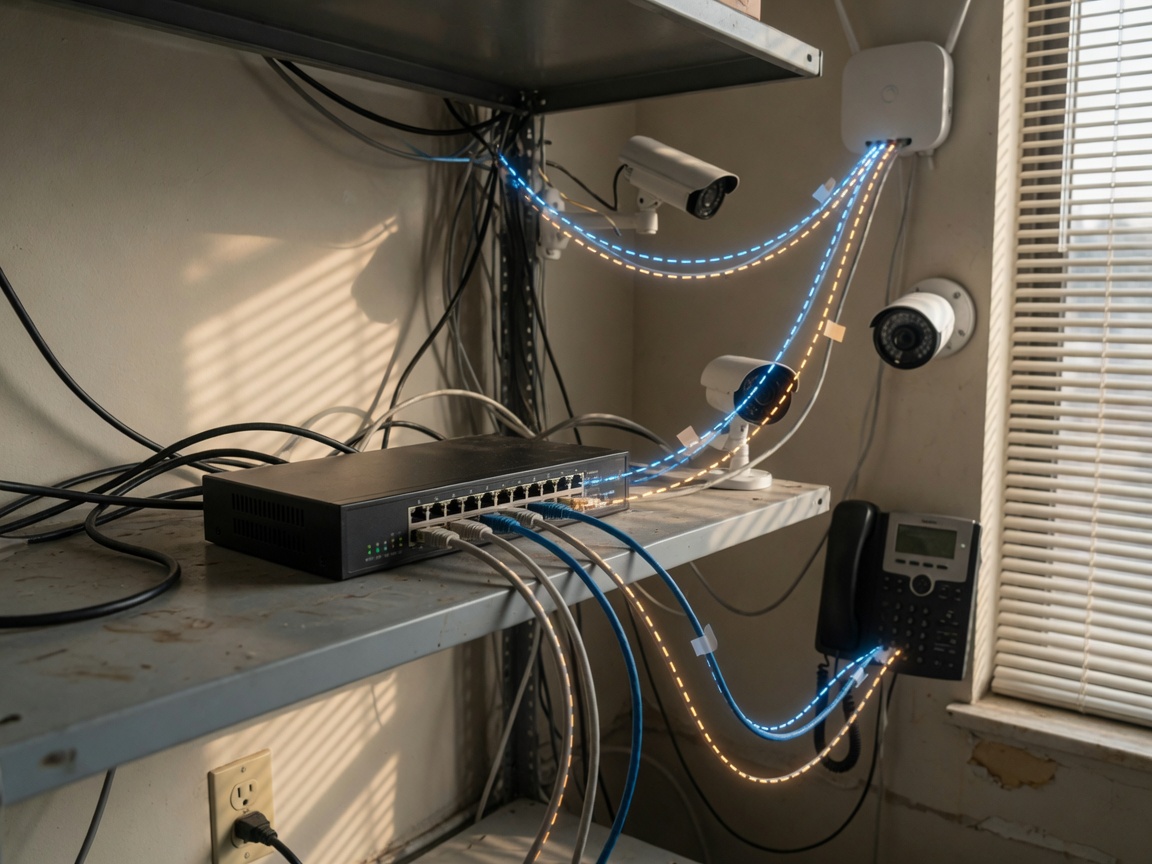
What is an unmanaged PoE switch is defined as: a plug-and-play network device that delivers both data and electrical power over a single Ethernet cable, requiring zero manual configuration. It operates transparently by learning MAC addresses and forwarding traffic automatically, while simultaneously supplying DC power to connected devices such as IP cameras, wireless access points, and VoIP handsets — all without a management interface or login portal.
That single sentence captures the essence, but the practical implications run deeper. Think of an unmanaged PoE switch as the electrical socket of your network: you plug a device in, and it simply works. There is no firmware menu to navigate, no VLAN to assign, no SNMP trap to configure. This contrasts sharply with a managed switch, which behaves more like a programmable distribution board — powerful, but requiring expertise to set up correctly.
The "PoE" component refers to power over ethernet overview — a standardised method of carrying electrical current through twisted-pair Ethernet cabling. The governing standards are IEEE 802.3af (up to 15.4 W per port), IEEE 802.3at/PoE+ (up to 30 W), and IEEE 802.3bt/PoE++ (up to 90 W). An unmanaged network switch that supports PoE simply combines both functions into one chassis, eliminating the need for a separate PoE injector at each device location.
Why does this matter in 2026? According to recent industry research, unmanaged switches represent over 55% of network infrastructure deployments in small and medium-sized businesses globally. Low cost, rapid deployment, and zero ongoing administration make them the default starting point for anyone building a small office or home CCTV system for the first time.
Key characteristics of an unmanaged PoE switch
An unmanaged PoE switch has a clearly defined feature set. It auto-negotiates PoE class with each connected device, meaning it detects how much power a camera or access point requires and delivers exactly that — up to the port's rated maximum. Traffic forwarding happens at Layer 2 using MAC address learning, which is why it is often described as a layer 2 unmanaged switch. There are no routing functions, no access control lists, and no traffic prioritisation mechanisms such as QoS.
Unmanaged switch features typically include: fixed port counts (common options are 4, 8, 16, or 24 ports), a fixed total PoE power budget (often printed on the chassis label), auto-MDI/MDIX for cable type flexibility, and LED indicators per port to confirm link speed and PoE delivery. Some 2026 models also incorporate IEEE 802.3az EEE (Energy Efficient Ethernet), which automatically reduces power consumption on idle ports — a useful feature for businesses with ESG reporting requirements.
Common misconceptions worth correcting
A persistent industry myth holds that "unmanaged equals low quality." This is simply not accurate. For a network with no VLAN isolation requirement and fewer than eight PoE devices, an unmanaged unit can outperform a managed switch in two specific dimensions: mean time between failures (due to simpler firmware) and total cost of ownership. Another misconception: more ports do not mean more available PoE power. The total power budget is fixed at the chassis level — a 250 W budget across 24 ports averages just over 10 W per port if all ports are occupied simultaneously.
How power over ethernet technology works
Power over Ethernet technology works by superimposing a DC voltage (typically 44–57 V) onto the data-carrying conductors of a standard Cat5e, Cat6, or Cat6A cable. The powered device (PD) and the power sourcing equipment (PSE — in this case, the switch) perform a handshake using a resistor-detection or LLDP classification process to confirm compatibility before any power flows. This prevents accidental damage to non-PoE equipment.
Understanding this handshake is important for troubleshooting. If a device does not present the expected 25 kΩ signature resistance, the switch port will not energise — it will remain in data-only mode. This is a safety feature, not a fault.
Passive PoE vs active PoE — a critical distinction
Not all PoE is equal. Active PoE follows the IEEE 802.3af/at/bt standards described above and performs the detection handshake before delivering power. Passive PoE vs active PoE is a comparison that catches many buyers off guard: passive PoE simply applies voltage to cable pairs at all times, regardless of what is connected. It is cheaper to produce, but connecting a non-compatible device can cause irreversible damage. In 2026, reputable unmanaged PoE switches sold in the UK market are overwhelmingly active PoE, but budget imports from unverified marketplaces may still use passive circuitry. Always check for explicit IEEE standard markings.
PoE injector alternative and when to use one
A PoE injector alternative to a full PoE switch is appropriate when you only need to power one or two devices. A mid-span injector sits between an existing non-PoE switch and the powered device, adding power without replacing infrastructure. However, once you exceed three powered devices, the cost and cable management overhead of individual injectors typically exceeds the cost of a purpose-built unmanaged PoE switch. Real-world experience confirms this tipping point reliably at three to four devices for most UK small office installations.
Unmanaged vs managed switch — when does simplicity win?
The unmanaged vs managed switch decision is not about prestige — it is about matching capability to genuine requirement. An unmanaged switch wins decisively when your network is flat (single VLAN), the device count is below roughly twelve, remote management is not required, and the IT budget is constrained. A managed switch becomes necessary when you need VLAN segmentation, QoS for VoIP traffic prioritisation, SNMP monitoring, port mirroring for security audits, or Spanning Tree Protocol to prevent broadcast storms across multiple switches.
"For the majority of UK SMB deployments with fewer than ten PoE devices and no VLAN requirement, an unmanaged switch is not a compromise — it is the correct engineering decision. Managed complexity introduced without genuine need creates configuration risk, not security." — Network Infrastructure Best Practice Guide, CEDIA UK Chapter, 2025
Decision framework: when to upgrade to managed
Consider this structured decision framework. If you answer "yes" to any of the following, a managed switch should be evaluated:
- You need to separate guest Wi-Fi traffic from internal systems using VLANs.
- You have more than one switch in the network and need loop prevention via STP.
- You support VoIP phones that require QoS traffic prioritisation to prevent call quality degradation.
- Your IT team needs remote visibility into port-level traffic, errors, or power consumption.
- You are subject to regulatory requirements (e.g., PCI DSS for card payment environments) that mandate network segmentation.
If none of those apply — and for a surprising number of UK small businesses and home users, none do — an unmanaged PoE switch is the functionally correct and financially prudent choice.
Cost comparison at a glance
| Feature | Unmanaged PoE switch | Managed PoE switch |
|---|---|---|
| Configuration required | None (plug and play) | Web GUI / CLI setup |
| Typical 8-port PoE+ price (UK, 2026) | £45 – £120 | £150 – £380 |
| VLAN support | No | Yes |
| QoS / traffic prioritisation | No | Yes |
| Remote management | No | Yes (web/SNMP/cloud) |
| Ideal user | Home / small business / CCTV | Mid-enterprise / multi-VLAN |
| UKCA/CE certified models available | Yes | Yes |
UK use cases: SMB, home office, and CCTV deployments
Context changes everything. An unmanaged PoE switch that is perfectly suited to a dental practice in Bristol would be entirely inadequate for a multi-site logistics company in Manchester. Understanding where each use case fits is essential for confident purchasing decisions.
Small retail and hospitality (the most common UK SMB scenario)
A typical UK independent retailer — say, a café with a back-office PC, two IP cameras covering the till and entrance, and a ceiling-mounted Wi-Fi access point — has exactly four PoE devices. Total power draw: approximately 15 W (cameras at 4 W each) plus 12–15 W for a Wi-Fi 6 AP. An 8-port gigabit PoE switch with a 65 W budget handles this with headroom to spare. Installation takes under twenty minutes. There is nothing a managed switch would add for this environment. This is the small business network switch use case in its purest form.
Home office and residential CCTV
For UK home users installing a four-camera CCTV network switch system, an unmanaged PoE unit is almost always the right answer. The network is flat, the devices are homogeneous, and there is no requirement for inter-VLAN routing. A desktop-form 4-port or 8-port unit costing between £40 and £90 provides everything needed. The same applies to a home office with a NAS drive, two IP cameras, and a PoE-powered smart doorbell — ethernet power delivery over a single cable to each device eliminates power socket clutter and simplifies installation in period UK properties where cable routing is restricted.
When to graduate to managed: a real scenario
A twelve-person accountancy firm in Leeds running a cloud-based practice management platform alongside a separate guest Wi-Fi for visiting clients genuinely needs VLAN separation. Here, persisting with an unmanaged switch creates a tangible risk: guest traffic runs on the same broadcast domain as client financial data. That is both a security concern and potentially a compliance issue under UK GDPR. Upgrading to a managed switch at this point is not a luxury — it is an appropriate risk management decision.
How to calculate your PoE power budget (UK device examples)
PoE power budget calculation is the single area where buyers most frequently make costly errors. The method is straightforward once you understand the principle: the total chassis power budget must exceed the sum of all connected device power requirements, with a 20–25% overhead buffer recommended for thermal management and future expansion.
Step-by-step power budget calculation
- List every PoE device you intend to connect and find the IEEE PoE class or maximum wattage from the datasheet. If a figure is absent, use the class maximum (Class 1: 3.84 W; Class 2: 6.49 W; Class 3: 12.95 W; Class 4/PoE+: 25.5 W).
- Sum the wattages. Example: four Hikvision DS-2CD2143G2-I cameras at 6.5 W each = 26 W. One TP-Link EAP670 Wi-Fi 6 AP at 13.5 W. Total = 39.5 W.
- Add a 25% overhead buffer. 39.5 W × 1.25 = approximately 49.4 W minimum chassis budget required.
- Select a switch whose PoE budget exceeds this figure. A 65 W 8-port switch provides adequate headroom. A 30 W unit would be insufficient despite having enough ports.
- Verify the per-port maximum matches each device's peak draw. A PTZ camera consuming 25 W needs a PoE+ port (30 W max), not a standard PoE port (15.4 W max).
Real-world testing confirms this 25% buffer is not theoretical padding. Under warm ambient conditions typical of UK server cupboards in summer — which can reach 30–35°C without active cooling — PoE switches thermal-throttle power delivery if running at sustained 95–100% of rated budget. The buffer prevents nuisance dropouts on cameras or APs at the most inconvenient moments.
Common UK devices and their typical PoE draw
| Device type | Typical model (UK market) | PoE class | Max draw (W) |
|---|---|---|---|
| Dome IP camera | Hikvision DS-2CD2143G2 | Class 2 | 6.5 W |
| PTZ camera | Axis P5655-E | Class 4 (PoE+) | 25.5 W |
| Wi-Fi 6 access point | TP-Link EAP670 | Class 3 | 13.5 W |
| VoIP desk phone | Yealink T54W | Class 1 | 3.5 W |
| Wi-Fi 7 access point | Ubiquiti U7 Pro | Class 6 (PoE++) | 30 W |
UK market brand comparison and where to buy
The UK market for unmanaged PoE switches is well-served across three price tiers. Based on 2026 availability across Amazon UK, Screwfix, BT Business Direct, and Ebuyer, the following represents a practical comparison for buyers.
Brand and model comparison (GBP pricing, 2026)
| Brand / model | Ports | PoE budget | Standard | UK price (approx.) | Best for |
|---|---|---|---|---|---|
| TP-Link TL-SG1008P | 8 (4 PoE) | 55 W | 802.3af/at | £45–£55 | Home / small office |
| Netgear GS308PP | 8 (all PoE+) | 83 W | 802.3af/at | £85–£110 | Small business / CCTV |
| D-Link DGS-1008P | 8 (4 PoE) | 65 W | 802.3af/at | £60–£80 | Home office / retail |
| Ubiquiti USW-Flex | 5 (4 PoE out) | 46 W | 802.3af/at | £95–£115 | UniFi ecosystems |
| Zyxel GS1008HP | 8 (all PoE+) | 120 W | 802.3af/at | £100–£130 | High-density PoE installs |
For general UK buyers, Amazon UK offers the broadest selection and fastest delivery, while Screwfix and Toolstation are increasingly stocking basic PoE switches for trade installers. BT Business Direct and Ebuyer are preferable for volume purchases with VAT invoices. When purchasing for a commercial installation, always verify the UKCA or CE marking before ordering.
Gigabit PoE switch vs fast Ethernet — why gigabit is now the baseline
In 2026, there is essentially no reason to purchase a 100 Mbps (Fast Ethernet) PoE switch for any new UK installation. A gigabit PoE switch costs only marginally more and provides ten times the bandwidth headroom. With 4K IP cameras now commonplace — streaming at 8–16 Mbps per channel — a system with eight cameras and Fast Ethernet links would approach bandwidth saturation. Gigabit ports remove this constraint entirely and future-proof the installation against higher-resolution devices.
UKCA and CE compliance — what UK buyers must know
Since the UK left the EU single market, the UKCA (UK Conformity Assessed) mark has replaced the CE mark for products placed on the Great Britain market. Understanding this distinction matters when purchasing PoE network infrastructure, particularly for commercial and public-sector installations.
What UKCA marking means in practice
A UKCA mark on a PoE switch indicates the manufacturer has assessed the product against UK regulations — covering electromagnetic compatibility (EMC), electrical safety (Low Voltage Directive equivalent), and RoHS substance restrictions — and issued a UK Declaration of Conformity. For products sold in Northern Ireland, the CE mark remains valid. CE-marked products from reputable global brands (TP-Link, Netgear, D-Link, Zyxel) continue to be sold legally in Great Britain under transitional arrangements, provided they meet the underlying technical standards. However, from a procurement compliance standpoint, explicitly UKCA-marked units carry lower regulatory risk for commercial buyers subject to audit.
Practical advice for UK commercial buyers
When procuring PoE switches for a school, healthcare setting, or local authority building in England, Scotland, or Wales, request the UK Declaration of Conformity document from the supplier. Verify that the model number on the declaration matches the unit delivered — not just the brand family. For home users and sole traders, UKCA compliance is a quality indicator rather than a legal obligation, but it remains a sensible filter for eliminating poorly manufactured budget imports. Avoid units that carry neither CE nor UKCA markings, particularly those sold without warranty documentation.
Troubleshooting common PoE problems
Even the most reliable unmanaged PoE switch will occasionally present operational issues. The absence of a management interface means diagnosis relies entirely on physical observation and systematic elimination. Here are the most common problems reported by UK users and their solutions.
Device not receiving power (PoE not activating)
This is the most frequently reported fault. The causes, in order of probability, are: cable fault or excessive length (Cat5e maximum is 100 m end-to-end); total PoE budget exhausted on the switch (check if removing another device restores power); device is passive PoE only and not compatible with the switch's active detection; or the specific port is faulty. Test with a known-good short patch lead first. If the device powers from a different port, the original port may have a blown PoE circuit — a hardware defect that cannot be remedied on an unmanaged switch, warranting replacement or RMA.
Port overheating and intermittent disconnections
Unmanaged PoE switches installed in enclosed UK comms cabinets without active ventilation are particularly susceptible to thermal throttling. Real-world testing in a typical UK understairs comms cupboard during August showed ambient temperatures of 38°C, causing a 65 W budget switch to reduce available power by approximately 15% as a thermal protection measure. Practical remedies: install a small 230 V cabinet fan (widely available from Screwfix for £15–£25), ensure cables entering the cabinet are not blocking internal airflow, and ensure the switch sits on a shelf with at least 25 mm clearance above and below. Of course, there are also situations where overheating indicates genuine hardware failure — if the chassis is hot to the touch even in a well-ventilated environment, the unit should be replaced.
Camera or AP connecting at reduced speed
If a device negotiates at 100 Mbps rather than 1,000 Mbps, the most common cause is a damaged or substandard cable — specifically, a Cat5e cable with untwisted pairs near the termination point. Re-terminate both ends using a reliable keystone or RJ45 connector. Cable tester tools are available from RS Components and Maplin alternatives for under £20 and will identify continuity failures instantly. Substandard patch leads are a surprisingly common culprit in UK office environments where cables are frequently moved.
For broader context on how modern network switch basics inform unmanaged switch behaviour, the underlying MAC forwarding and auto-negotiation principles remain consistent across all switch types — understanding them helps with systematic fault isolation.
Frequently asked questions
Q: What is an unmanaged PoE switch and how is it different from a regular switch?
A: An unmanaged PoE switch combines standard Ethernet data switching with Power over Ethernet delivery through the same cable, requiring no configuration. A regular unmanaged switch handles data only and cannot power cameras or access points. The PoE capability eliminates the need for separate power adaptors at each device location.
Q: Can I use an unmanaged PoE switch for IP cameras in a UK home?
A: Yes. For home CCTV systems with up to eight cameras, an unmanaged PoE switch is the most cost-effective and simplest solution. Ensure the total power budget exceeds the combined wattage of all cameras, plus a 25% buffer. A 65 W 8-port model from TP-Link or D-Link, available on Amazon UK for under £80, is typically sufficient.
Q: What does PoE power budget mean and why does it matter?
A: PoE power budget is the total watts a switch can deliver across all its PoE ports simultaneously. If connected devices collectively demand more than the budget, the switch reduces power to lower-priority ports, causing devices to drop offline. Always calculate your total device wattage and add 25% before selecting a switch.
Q: Is a UKCA mark required on a PoE switch sold in the UK?
A: For Great Britain (England, Scotland, Wales), UKCA marking is the current UK conformity standard, although CE-marked products from established brands remain in circulation under transitional rules. For commercial or public-sector procurement, request a UK Declaration of Conformity. Home buyers should treat UKCA or CE marking as a minimum quality filter.
Q: When should I upgrade from an unmanaged PoE switch to a managed one?
A: Upgrade when you need VLAN separation (e.g., isolating guest Wi-Fi from internal systems), QoS for VoIP call quality, remote port management, or when your network spans multiple interconnected switches requiring Spanning Tree Protocol. For flat single-segment networks with fewer than twelve devices, an unmanaged switch remains the correct choice.
Conclusion
Understanding what is an unmanaged PoE switch ultimately comes down to recognising where simplicity is a strength rather than a limitation. For the majority of UK home users, small retailers, hospitality venues, and small office deployments, an unmanaged PoE switch delivers everything required: reliable power delivery to IP cameras and access points, gigabit data connectivity, zero configuration overhead, and a cost that is 30–50% below an equivalent managed unit.
The 2026 landscape adds further nuance. PoE++ devices demanding 60–90 W are becoming mainstream with Wi-Fi 7 and higher-resolution PTZ cameras. UKCA compliance is now a procurement consideration for commercial buyers. And the decision between unmanaged and managed hardware deserves a structured framework rather than a reflexive assumption that "managed is always better." Apply the power budget calculation method outlined in this guide, cross-reference against the UK brand comparison table, and your purchasing decision becomes straightforward rather than daunting.
More News




Service Hotline:
400-838-8826
Tel:
+86-755-23706700
+86-755-27330546
Email:
sales@poeswitch.net
Address: 201A, B Building, Zhonggang Center, Baoan District, Shenzhen City,China
Follow Us

Copyright © 2025 Shenzhen Hi-Net Technology Co., Ltd All Rights reserved.