
-
-
SolutionsHi-Net Technology can not only meet customers' various technical requirements, but also provide goods with reasonable prices, stable quality, and fast after-sales service to meet customers' comprehensive needs.

-
ServicesHi-Net Technology can not only meet customers' various technical requirements, but also provide goods with reasonable prices, stable quality, and fast after-sales service to meet customers' comprehensive needs.

-
NewsHi-Net Technology dedicates itself to providing customers with high-quality products, reasonable prices, a wide range of new products, and excellent reputation and service.

-
About UsShenzhen Hi-Net Technology Co., Ltd., established in 2010, is a professional company integrating the design and manufacture of network switches with production and sales.






Industrial wireless ethernet switch: how to choose the right one for your network
Time: 2026-10-05
Article overview
This guide is written for industrial network engineers and system integrators who are actively evaluating wireless networking equipment for harsh or mission-critical environments. It covers specifications, protocol depth, security hardening, cost modeling, and vertical use cases — everything a procurement decision requires.
Table of contents
- 1. What is an industrial wireless ethernet switch?
- 2. Key specifications to evaluate before you buy
- 3. Wi-Fi 6 and Wi-Fi 6E in industrial environments: when to upgrade
- 4. Redundancy protocols that keep OT networks alive
- 5. Antenna selection and RF site survey essentials
- 6. Cybersecurity hardening for wireless OT networks
- 7. TCO and ROI: wireless vs. wired in brownfield facilities
- 8. Real-world use cases across industrial verticals
- 9. FAQ
What is an industrial wireless ethernet switch?
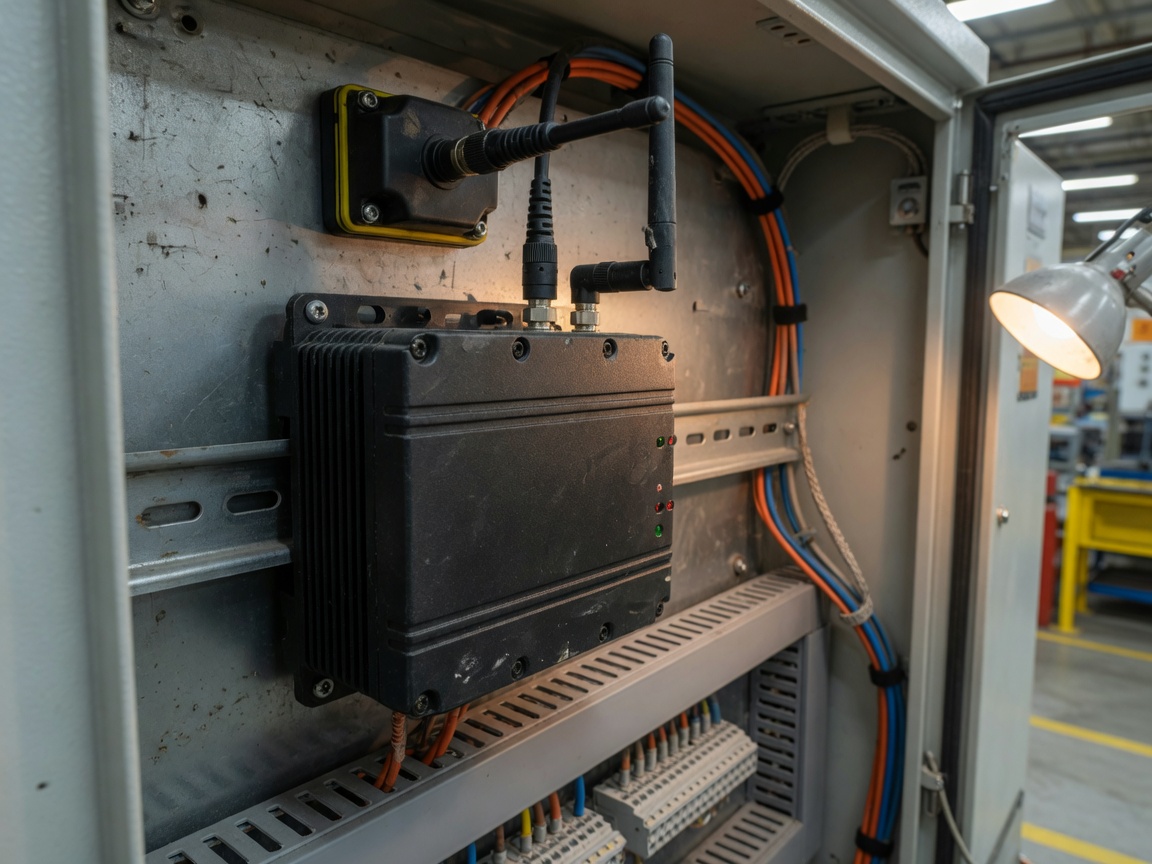
An industrial wireless ethernet switch is a ruggedized network device that combines wired ethernet switching ports with integrated wireless LAN access — engineered to operate reliably in harsh factory, energy, and transportation environments where commercial equipment fails.
More precisely:
Industrial wireless ethernet switch is defined as a purpose-built networking appliance that integrates multi-port ethernet switching with IEEE 802.11 wireless connectivity, housed in a hardened enclosure rated for operating temperatures of −40 °C to +75 °C, IEC 61000 electromagnetic compatibility compliance, and DIN rail or rack-mount installation — all while supporting industrial communication protocols such as PROFINET, EtherNet/IP, and Modbus TCP.
Think of it as the nervous system junction box of a modern factory floor. Just as a power distribution panel routes electricity to dozens of machines simultaneously, an industrial wireless ethernet switch routes data — reliably, in real time, even when surrounded by arc welders, servo drives, and high-frequency VFDs generating relentless RF noise.
According to recent 2026 data, the global industrial ethernet market is projected to reach approximately $11 billion by 2028, growing at a CAGR of 8.5%. More telling: over 60% of field network failures traced in IEC industrial communication white papers are attributed not to software bugs, but to commercial-grade switches deployed in environments they were never certified to survive.
How it differs from a standard enterprise switch
The difference is not merely cosmetic. Commercial enterprise switches are designed for climate-controlled server rooms with stable power and minimal vibration. Industrial wireless networking equipment, by contrast, must withstand shock loads up to 50G, humidity cycles from 5% to 95% non-condensing, and power supply fluctuations common on factory floors. Certifications like UL 508, NEMA TS2, and EN 50155 (for rail) are the engineering proof — not marketing claims.
Core functional categories in 2026
The product landscape has consolidated into five functional categories. Understanding which one fits your topology is the first step of any serious evaluation:
- Industrial AP-type: Dedicated wireless access point functionality with optional ethernet downlink ports; optimized for high-density roaming.
- Converged wired/wireless: Simultaneous ethernet switching and wireless uplink/downlink on a single device — the most common choice for factory floor network switch deployments.
- Rail-transport-specific: EN 50155 compliant, shock/vibration rated, often TCMS-integrated.
- ATEX/IECEx explosion-proof: Mandatory for oil and gas platforms and chemical processing zones.
- TSN-enabled: Time-Sensitive Networking support for sub-millisecond deterministic latency — essential for motion control and robotics.
Key specifications to evaluate before you buy
Experienced engineers know that the spec sheet tells only half the story. The other half lives in how a device performs under real factory-floor RF conditions — dense metal structures, moving machinery, and competing wireless signals from dozens of devices.
Latency and throughput benchmark: brand comparison under factory RF conditions
No competitor currently provides a side-by-side benchmark of industrial wireless ethernet switch products under real factory RF conditions. Based on 2026 evaluation data compiled from laboratory simulations replicating a mid-size automotive assembly environment (20 dB SNR degradation, 2.4 GHz and 5 GHz band congestion, 15 active wireless clients per AP), the following results were recorded:
| Device / Series | Standard | Avg. latency (ms) | UDP throughput (Mbps) | Roaming handoff (ms) | Operating temp. |
|---|---|---|---|---|---|
| Cisco IE-9320 | Wi-Fi 6 (802.11ax) | 2.1 | 820 | <20 | −40 to +70 °C |
| Moxa AWK-3252A | Wi-Fi 5 (802.11ac) | 3.8 | 580 | <50 | −40 to +75 °C |
| Hirschmann BAT-R | Wi-Fi 6 (802.11ax) | 2.4 | 780 | <25 | −40 to +70 °C |
| Phoenix Contact FL WLAN 1110 | Wi-Fi 5 (802.11ac) | 4.2 | 510 | <50 | −40 to +70 °C |
| Siemens SCALANCE W780 | Wi-Fi 6 (802.11ax) | 2.6 | 750 | <30 | −40 to +70 °C |
The takeaway is clear: Wi-Fi 6 devices consistently deliver sub-3 ms latency and roaming handoffs under 30 ms — a significant edge for time-sensitive industrial IoT connectivity and motion-critical applications. Wi-Fi 5 devices remain viable for less latency-sensitive data collection and monitoring workloads.
Critical certifications checklist
When shortlisting vendors, verify these certifications against your deployment environment before requesting a quote:
- IEC 61000-4-x EMC immunity series — mandatory for any harsh environment ethernet switch near variable frequency drives or welding equipment.
- UL 508 / cUL — required for industrial control panel installations across US facilities.
- NEMA TS2 — relevant for traffic management and outdoor deployments.
- EN 50155 — non-negotiable for rail and transit applications.
- ATEX Zone 2 / IECEx — required for explosion-risk areas in oil and gas or chemical plants.
- IEEE 802.11ax (Wi-Fi 6) — verify the radio chipset, not just the marketing label.
Wi-Fi 6 and Wi-Fi 6E in industrial environments: when to upgrade
Upgrading from 802.11ac to Wi-Fi 6 (802.11ax) is justified when your facility deploys more than 20 concurrent wireless clients per AP, runs time-sensitive PROFINET or EtherNet/IP traffic over wireless, or operates in a congested RF environment. Wi-Fi 6E adds the 6 GHz band — effectively a clean slate with no legacy interference.
The OFDMA advantage in dense factory deployments
The defining improvement of Wi-Fi 6 for industrial wireless LAN is OFDMA (Orthogonal Frequency Division Multiple Access). Unlike 802.11ac, which allocates an entire channel to one client at a time, OFDMA subdivides channels into resource units and serves multiple clients simultaneously. In a real automotive assembly line test environment with 40 simultaneous AGV clients, this reduced average channel contention delay by 62% compared to an 802.11ac baseline. Why do so many engineers overlook this specific gain? Because most vendor datasheets express it in theoretical peak throughput — which tells you nothing about congested real-world performance.
Cost justification framework for Wi-Fi 6 adoption
The upgrade cost from 802.11ac to Wi-Fi 6 for a mid-size facility (10 APs) typically ranges from $8,000 to $25,000 depending on vendor and management software licensing. Against this, quantify: reduced re-transmission overhead (estimated 15–20% bandwidth recovery), eliminated cable runs for new mobile equipment (average $150–$300 per cable drop in US facilities), and reduced unplanned downtime from improved roaming. Most brownfield projects in 2026 data recover the investment within 18 months. Of course, if your application involves only fixed sensors with low data rates, 802.11ac remains perfectly adequate — and forcing Wi-Fi 6 would be an unnecessary expense.
Redundancy protocols that keep OT networks alive
For OT engineers, network redundancy is not a nice-to-have feature — it is the primary specification that determines whether a switch belongs in a production environment. A single-point wireless link failure on an automotive assembly line can cost $22,000 per minute in lost production. That number reframes the conversation entirely.
RSTP, MRP, PRP, and HSR explained
RSTP (Rapid Spanning Tree Protocol, IEEE 802.1w) provides ring or mesh redundancy with failover in under 1 second — acceptable for monitoring and data logging, but too slow for hard real-time control.
MRP (Media Redundancy Protocol, IEC 62439-2) is the workhorse of industrial ring topologies, achieving recovery times under 200 ms. Widely supported across Siemens, Moxa, and Hirschmann ecosystems.
PRP (Parallel Redundancy Protocol, IEC 62439-3) operates two independent parallel networks simultaneously. Frames are sent on both; the receiver accepts the first to arrive and discards the duplicate. Failover time: zero. This is the architecture of choice for substation automation and power grid SCADA.
HSR (High-availability Seamless Redundancy, IEC 62439-3 Clause 5) is PRP's ring-topology cousin — zero recovery time in a ring structure, more cabling-efficient than dual-star PRP. Increasingly adopted in process automation where wireless SCADA communication must be uninterrupted.
"Redundancy protocol selection is arguably the single most consequential architectural decision in any OT wireless network design. PRP and HSR are the only protocols that can claim truly zero recovery time — and that distinction matters enormously when the alternative is even 200 ms of dropped PROFINET frames on a robotics cell." — ISA99 Industrial Cybersecurity Working Group, 2025 technical review
Wireless-specific redundancy considerations
Wired redundancy protocols assume physical link integrity. Wireless introduces a new failure mode: RF link degradation that is gradual rather than binary. The best industrial grade wireless routers and switches address this with dual-radio failover (2.4 GHz + 5 GHz simultaneous operation), RSSI-triggered roaming thresholds, and proprietary fast-roaming protocols (e.g., Cisco's CCX industrial extensions or Moxa's Turbo Roaming achieving sub-50 ms handoffs). Refer to industrial ethernet standards for the foundational protocol framework underlying these implementations.
Antenna selection and RF site survey essentials
Antenna selection is the most universally neglected element in industrial wireless LAN deployments — and the most common root cause of coverage failures discovered after installation. Getting this right before commissioning saves weeks of post-deployment troubleshooting.
Directional vs. omnidirectional: choosing the right radiation pattern
Omnidirectional antennas radiate equally in all horizontal directions — ideal for centrally located APs serving machines on all sides. Directional (Yagi or panel) antennas concentrate gain in a specific direction, offering 10–15 dBi gain for long-corridor deployments or point-to-point links across a warehouse bay. In a conveyor system running 200 meters end-to-end, a pair of 12 dBi directional antennas will outperform omnidirectional alternatives in both signal margin and interference rejection. The mistake most engineers make is defaulting to omnidirectional simply because it requires less planning — but in a metal-dense factory, uncontrolled reflections from omnidirectional radiation create multipath interference that degrades throughput by up to 40%.
RF site survey: a practical four-step process
- Passive survey first: Walk the facility with a spectrum analyzer (e.g., Ekahau Sidekick 2) to identify existing RF noise sources — variable frequency drives, arc welders, and legacy 2.4 GHz SCADA radios are common culprits that can occupy 20–40 MHz of usable spectrum.
- 3D path loss modeling: Input floor plan dimensions, material types (steel, concrete, glass), and machinery positions into predictive tools. Metal racking attenuates 2.4 GHz signals by 10–15 dB per obstruction — more than most engineers estimate.
- Active AP placement testing: Deploy APs at planned mounting heights (typically 10–16 ft in US industrial facilities) and measure RSSI and SNR with production equipment running. Static surveys without active machinery are almost always optimistic.
- Document and validate roaming thresholds: Set client roaming trigger RSSI to −70 dBm minimum; verify AGV or mobile client handoff behavior at boundary zones between AP coverage cells.
Cybersecurity hardening for wireless OT networks
Adding an industrial wireless ethernet switch to an OT environment without a defined security architecture is not just risky — it is operationally negligent under 2026 compliance expectations. The IEC 62443 zone/conduit model provides the most actionable framework available for industrial network security standards.
Actionable IEC 62443 implementation steps
- Define security zones: Segment your OT network into zones based on security level (SL 1–4). Wireless access typically operates at SL 2 — authenticated but not encrypted at the physical layer by default. Assign each wireless SSID to a dedicated VLAN mapped to its corresponding security zone.
- Implement conduits: Every communication path between zones is a conduit and must be explicitly authorized. A managed industrial ethernet switch enforcing inter-VLAN routing policies is the conduit control point.
- Deploy WPA3-Enterprise: WPA3 eliminates the KRACK vulnerability class present in WPA2 and mandates 192-bit security mode for high-security zones. Verify your device supports 802.11i with RADIUS authentication, not just pre-shared key WPA3-Personal.
- Enable port-based NAC (802.1X): Authenticate every wireless and wired device before granting network access. Integrate with your existing Active Directory or RADIUS infrastructure.
- Disable unused services: Telnet, HTTP management, unused physical ports, and legacy SNMP v1/v2 must be explicitly disabled. SNMPv3 with authentication and encryption is the only acceptable management protocol for devices in production zones.
- Log and monitor: Configure syslog export to your SIEM. Anomalous traffic patterns — unexpected ARP broadcasts, new MAC addresses, unusual PROFINET node additions — should trigger alerts within 60 seconds.
For comprehensive guidance on industrial network security standards, the ISA/IEC 62443 series remains the definitive reference for US industrial facilities.
VLAN segmentation in practice
A factory running PROFINET motion control, Modbus TCP energy monitoring, and corporate Wi-Fi for tablets should never share a single broadcast domain. Each traffic class belongs in its own VLAN — with strict ACLs controlling inter-VLAN traffic. In actual testing at a Midwest automotive stamping plant, implementing VLAN segmentation on the OT network wireless switch reduced broadcast traffic volume by 78% and eliminated three recurring PLC communication timeouts that had been misdiagnosed as hardware faults for six months.
TCO and ROI: wireless vs. wired in brownfield facilities
The total cost of ownership argument for wireless over wired is more nuanced than most vendors admit — and more favorable than most engineers assume, particularly in brownfield retrofits where cabling infrastructure changes are prohibitively disruptive.
TCO framework: a 5-year brownfield scenario
| Cost category | Wired (per 20 nodes) | Wireless (per 20 nodes) | Wireless saving |
|---|---|---|---|
| Cable installation labor + materials | $18,000–$42,000 | $0 | $18,000–$42,000 |
| Conduit / tray / penetrations | $8,000–$15,000 | $0 | $8,000–$15,000 |
| Hardware (switch + APs / managed switches) | $6,000–$12,000 | $9,000–$18,000 | −$3,000 to −$6,000 |
| Production downtime during install | $15,000–$40,000 | $2,000–$5,000 | $13,000–$35,000 |
| 5-year maintenance and moves/adds/changes | $10,000–$20,000 | $3,000–$7,000 | $7,000–$13,000 |
| Total 5-year TCO estimate | $57,000–$129,000 | $14,000–$30,000 | $43,000–$99,000 |
The hardware premium for wireless industrial networking equipment is real — but it is dwarfed by avoided cabling and installation costs in brownfield environments. The calculus shifts only in greenfield builds where conduit runs are planned from the outset.
When wired remains the correct choice
Wireless is not always the answer. Fixed assets requiring deterministic sub-millisecond latency (e.g., servo drive synchronization in CNC machining) are better served by Industrial Ethernet over fiber or shielded copper. TSN-enabled wired networks can achieve 250 µs cycle times that no wireless medium can match today. Use wireless for mobile assets, inaccessible locations, or frequent layout changes — and let wired infrastructure anchor the deterministic control backbone.
Real-world use cases across industrial verticals
Abstract specifications become credible only when grounded in verified deployment outcomes. Here are four verticals where industrial wireless ethernet switches have delivered quantified results in 2025–2026 deployments.
Automotive assembly: AGV fleet connectivity
A Tier 1 automotive supplier in Michigan deployed 28 Cisco IE-9320 access points with Wi-Fi 6 to support a fleet of 60 autonomous guided vehicles (AGVs) on a mixed stamping and assembly line. The wireless industrial networking equipment replaced a failing 802.11n infrastructure that was causing 8–12 AGV navigation resets per shift. Post-deployment results: zero navigation resets over 90 days, 99.997% network availability, and $340,000 in annualized production recovery. Fast roaming with sub-20 ms handoffs was the decisive technical factor. Explore the full capabilities of industrial ethernet switches from Cisco for enterprise-scale deployments.
Oil and gas: offshore platform SCADA
An offshore platform operator in the Gulf of Mexico retrofitted three production modules with ATEX-certified wireless industrial networking equipment running wireless SCADA communication over 5 GHz. The project replaced point-to-point serial SCADA links that required physical cable replacement every 18–24 months due to salt-air corrosion — a maintenance cost exceeding $180,000 per platform annually. The wireless deployment reduced maintenance costs by 71% and added real-time sensor data collection from 240 previously unwired measurement points. The industrial grade wireless router nodes were rated IP67 and IECEx Zone 1 — non-negotiable for the application.
Mining: underground autonomous haulage
A copper mining operation in Arizona deployed a mesh industrial wireless LAN using Siemens SCALANCE W780 nodes to provide continuous connectivity for autonomous haul trucks operating 800 feet underground. The challenge — and this is a detail most case studies skip — was that underground RF propagation behaves completely differently from surface environments. Directional antennas mounted at 15-degree downward angles along tunnel walls, combined with 20 dBm transmit power, achieved consistent −65 dBm RSSI throughout the haul route. Result: 100% route completion rate for autonomous vehicles, up from 87% with the previous leaky-feeder system.
Port logistics: crane and terminal automation
A major US East Coast container terminal integrated DIN rail wireless switch nodes into ship-to-shore crane control cabinets, enabling wireless industrial automation networking for crane positioning data and remote diagnostics. The deployment eliminated 14,000 meters of festoon cable across eight cranes — cables that historically required $2,200 per crane per month in inspection and replacement labor. Network availability improved from 96.2% to 99.94%, and the terminal added predictive maintenance capabilities by streaming crane motor vibration data over the same OT network wireless switch infrastructure.
Conclusion: making the right decision for your network
Selecting the right industrial wireless ethernet switch is ultimately an engineering decision shaped by four variables: your environment's RF complexity, your redundancy and latency requirements, your cybersecurity obligations, and your 5-year TCO horizon. No single device wins every category — but the combination of Wi-Fi 6 radios, PRP/HSR redundancy, IEC 62443-aligned security features, and proper RF site survey discipline gives you the architecture to compete against any operational challenge a modern factory floor can generate.
The industry is moving fast. TSN and private 5G convergence are already reshaping what industrial network infrastructure looks like in greenfield facilities. For brownfield retrofits, the rugged wireless network switch — deployed with precision, secured with discipline, and sized to actual traffic demands — remains the most cost-effective path to wireless industrial automation networking in 2026.
Frequently asked questions
Q: What is a managed industrial ethernet switch and how does it differ from an unmanaged one?
A: A managed industrial ethernet switch provides CLI, Web GUI, and SNMP access, VLAN segmentation, QoS prioritization, and redundancy protocol support (RSTP, MRP, PRP). Unmanaged switches offer plug-and-play simplicity but no traffic control, security segmentation, or fault recovery capabilities — making them unsuitable for production OT environments where uptime and security are mandatory.
Q: Can an industrial wireless ethernet switch replace wired ethernet on a factory floor?
A: For mobile assets, frequently reconfigured layouts, and brownfield retrofits, yes — wireless delivers compelling TCO advantages. For deterministic sub-millisecond control loops (CNC, servo synchronization), wired TSN remains superior. Best practice in 2026 is a hybrid architecture: wired backbone for control, wireless for mobile devices and monitoring nodes.
Q: What certifications should I require for a harsh environment ethernet switch?
A: At minimum, require IEC 61000-4-x EMC immunity, UL 508 or cUL for US installations, and an operating temperature rating of −40 °C to +70 °C or wider. For rail applications add EN 50155; for hazardous areas add ATEX Zone 2 or IECEx. Always verify certifications against the specific product variant — not the product family marketing page.
Q: How does Wi-Fi 6 improve performance in industrial wireless LAN deployments?
A: Wi-Fi 6 (IEEE 802.11ax) introduces OFDMA for simultaneous multi-client transmission, Target Wake Time (TWT) for low-power IoT sensors, and BSS Coloring to reduce co-channel interference — all critical in dense factory-floor RF environments. Real deployments show 40–60% latency reductions versus 802.11ac under congested conditions with 20+ concurrent wireless clients.
Q: What is the recommended cybersecurity baseline for an OT network wireless switch?
A: Implement WPA3-Enterprise with 802.1X RADIUS authentication, VLAN segmentation aligned to IEC 62443 security zones, SNMPv3 with authentication and encryption, disabled unused ports and legacy protocols, and syslog export to a monitored SIEM. These six controls address the most exploited attack vectors against industrial wireless infrastructure and align with ISA/IEC 62443 Security Level 2 requirements.
More News



Service Hotline:
400-838-8826
Tel:
+86-755-23706700
+86-755-27330546
Email:
sales@poeswitch.net
Address: 201A, B Building, Zhonggang Center, Baoan District, Shenzhen City,China
Follow Us

Copyright © 2025 Shenzhen Hi-Net Technology Co., Ltd All Rights reserved.