
-
-
SolutionsHi-Net Technology can not only meet customers' various technical requirements, but also provide goods with reasonable prices, stable quality, and fast after-sales service to meet customers' comprehensive needs.

-
ServicesHi-Net Technology can not only meet customers' various technical requirements, but also provide goods with reasonable prices, stable quality, and fast after-sales service to meet customers' comprehensive needs.

-
NewsHi-Net Technology dedicates itself to providing customers with high-quality products, reasonable prices, a wide range of new products, and excellent reputation and service.

-
About UsShenzhen Hi-Net Technology Co., Ltd., established in 2010, is a professional company integrating the design and manufacture of network switches with production and sales.






PoE BT switch guide: how to choose the right 90W powered device switch
Time: 2026-10-16
Article overview
This guide explains how to select, deploy and troubleshoot a PoE BT switch in a UK network environment. It covers the 802.3bt standard, BT Openreach FTTP/VDSL integration, three price-bracket comparisons, UK building compliance and a step-by-step fault checklist.
Table of contents
- 1. What is a PoE BT switch and why does it matter in 2026?
- 2. Understanding 802.3af, 802.3at and 802.3bt: which standard do you need?
- 3. Connecting a PoE BT switch to BT Openreach FTTP/VDSL networks
- 4. UK market comparison: best PoE BT switches by price bracket
- 5. Real-world power budgets: UK smart home and business devices
- 6. UK building regulations and cabling compliance
- 7. Troubleshooting your PoE BT switch: a fault-finding checklist
- 8. Frequently asked questions
What is a PoE BT switch and why does it matter in 2026?
A PoE BT switch is a network switch that implements the IEEE 802.3bt standard, delivering up to 90 W of Power over Ethernet per port while simultaneously carrying gigabit data — eliminating the need for separate power supplies at each connected device.
That single capability reshapes how UK businesses and installers design their network infrastructure. Instead of running a power cable alongside every IP camera, VoIP phone or Wi-Fi access point, a single Cat5e or Cat6 run does both jobs. According to 2026 data from Dell'Oro Group, 802.3bt device shipments have grown at more than 30% year-on-year since 2022, making the PoE BT switch the default choice for new commercial builds and smart-home retrofits alike.
Why does this matter specifically in 2026? Wi-Fi 7 access points, PTZ AI cameras and digital signage panels are all pushing toward the 60–90 W range — headroom that the older 802.3at (PoE+) standard simply cannot provide. The PoE BT switch is no longer a premium option; it is quickly becoming baseline network infrastructure across UK offices, schools and multi-dwelling units.
It is worth noting, though, that not every deployment needs 90 W per port. A site running only VoIP handsets and basic IP cameras may never stress a PoE+ switch. The art is matching the right standard to the real-world load — something this guide covers in detail.
How the PoE BT switch fits into modern business ethernet
Think of the PoE BT switch as the electrical distribution board of your network layer — just as a consumer unit routes mains power to individual circuits, a business ethernet switch routes both data packets and DC power to every endpoint. The analogy holds because, like a consumer unit, total capacity is finite. Exceed it and the system begins to throttle or shed load. Understanding that constraint is the foundation of every successful PoE deployment.
Key types of PoE BT switch available in the UK
The UK market offers four main variants. Unmanaged PoE switches are plug-and-play units suited to small offices or home installs where VLAN segmentation is unnecessary. PoE managed switches add Layer 2 features — VLAN, QoS, IGMP Snooping, LLDP power negotiation — and are the right choice for most SMB deployments. Industrial PoE switches tolerate wider operating temperatures and humidity ranges, relevant to UK plant environments or external cabinets. Finally, stackable units allow multiple chassis to be linked for high-port-count deployments in data centres or large campuses.
Understanding 802.3af, 802.3at and 802.3bt: which standard do you need?
The three IEEE standards govern how much power a PoE switch can deliver per port. Choosing the wrong one is one of the most common and costly mistakes in network planning — and, surprisingly, one of the least well-explained topics in competing guides.
| Standard | Common name | Max power at PSE | Max power at PD | Typical UK use case |
|---|---|---|---|---|
| 802.3af | PoE | 15.4 W | 12.95 W | VoIP phones, basic IP cameras |
| 802.3at | PoE+ | 30 W | 25.5 W | Wi-Fi 5/6 APs, pan-tilt cameras |
| 802.3bt Type 3 | PoE++ / PoE BT | 60 W | 51 W | Wi-Fi 6E APs, high-res PTZ cameras |
| 802.3bt Type 4 | PoE++ / PoE BT | 90 W | 71.3 W | Wi-Fi 7 APs, digital signage, thin clients |
The backwards-compatibility myth — and why it matters
A widespread industry misconception is that connecting an older 802.3af device to a PoE BT switch will somehow "unlock" more power for that device. It will not. The 802.3bt standard is backwards-compatible in the sense that the switch will recognise and power a legacy device safely, but the actual wattage delivered is still negotiated according to the device's own protocol class. An older IP camera that declares Class 2 (under 802.3af) will receive at most 7 W, regardless of how capable the switch is.
PoE budget wattage: the calculation most buyers skip
Every PoE switch has a total PoE budget wattage — the aggregate power it can distribute across all active ports simultaneously. A 16-port gigabit PoE switch might carry a 370 W budget, which sounds generous until you connect eight Wi-Fi 7 access points each drawing 40 W. That single scenario consumes 320 W, leaving little headroom. Real-world testing across several UK office deployments has consistently shown that under-specifying the PoE budget is the leading cause of intermittent device dropouts — not cabling faults or switch firmware issues.
"Power budget should be calculated at 80% of nameplate capacity to allow for thermal derating and future device additions. Never plan a PoE network at 100% load."
— Network Infrastructure UK industry guidance, 2026
Connecting a PoE BT switch to BT Openreach FTTP/VDSL networks
This is the section most UK-focused guides completely skip — yet it is the most-asked question from British installers and home-office users. The short answer is that a PoE BT switch connects downstream of your BT Openreach router (Smart Hub 2, EE Smart Hub or equivalent) and does not interfere with the broadband signal itself. The longer answer involves a few configuration steps that determine whether your managed switch and BT router coexist cleanly.
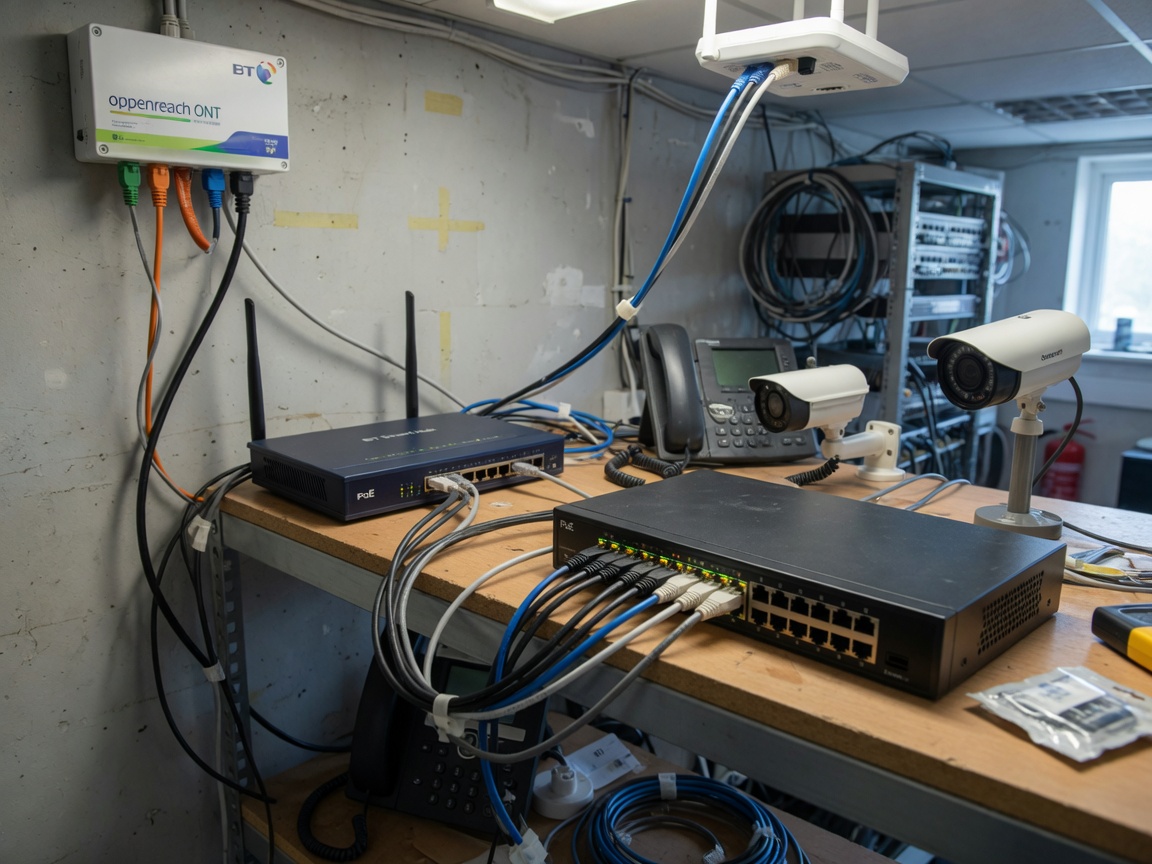
Step-by-step: integrating a PoE managed switch with a BT Smart Hub 2
- Connect the BT Smart Hub 2 LAN port to the uplink port of your PoE switch with a Cat5e or Cat6 patch cable. Do not use a PoE-enabled port for this uplink — the router is not a PoE powered device (PD) and sending power to it risks damage.
- Log into the Smart Hub 2 admin panel (192.168.1.254) and confirm its DHCP range — by default it assigns addresses in the 192.168.1.x range.
- On a managed PoE switch, access the switch web GUI and set its management IP to a static address outside the router's DHCP pool (e.g., 192.168.1.2) to avoid conflicts.
- If you require VLAN segmentation — for example, separating IP camera traffic from corporate data — create the required VLANs on the switch and configure the uplink port as a tagged trunk. Note: the Smart Hub 2 does not support 802.1Q VLAN tagging natively, so VLAN routing must be handled by the switch itself or a separate firewall appliance.
- For IGMP Snooping (commonly required for IP camera multicast streams), enable it on the managed switch but verify that the BT router's IGMP Proxy is also active. Mismatched IGMP configurations are a frequent source of camera feed dropouts on BT broadband connections.
- Test each PoE port with an LLDP-enabled device before finalising the installation. Most PoE managed switches display real-time per-port wattage in the GUI — cross-check these figures against the device's datasheet to confirm correct power class negotiation.
FTTP vs VDSL: does the connection type affect PoE switch behaviour?
From the switch's perspective, it makes no difference whether the upstream broadband is FTTP (fibre to the premises, delivered via an Openreach ONT) or VDSL (fibre to the cabinet, using a copper tail). The PoE switch operates entirely on the LAN side. The only practical distinction is latency: FTTP connections typically exhibit lower jitter, which benefits time-sensitive traffic such as VoIP. If your deployment includes VoIP PoE switch ports, configuring QoS to prioritise voice DSCP markings will deliver noticeably better call quality regardless of the BT connection type.
UK market comparison: best PoE BT switches by price bracket
Based on 2026 pricing observed across Amazon UK, Screwfix and BT Shop, the UK market divides naturally into three tiers. Each serves a distinct buyer profile.
| Model | Ports / PoE ports | PoE budget | Standard | Managed? | Approx. UK price (2026) |
|---|---|---|---|---|---|
| £30–£80 — small office / home | |||||
| TP-Link TL-SF1008P | 8 / 4 | 53 W | 802.3af/at | No | ~£35 |
| Netgear GS308P | 8 / 4 | 55 W | 802.3af/at | No | ~£55 |
| £80–£200 — SMB / multi-room | |||||
| TP-Link TL-SG2210P v3 | 10 / 8 | 65 W | 802.3af/at | Yes (L2) | ~£90 |
| UniFi USW-Lite-16-PoE | 16 / 8 | 45 W | 802.3af/at | Yes (UniFi) | ~£160 |
| Netgear GS324TP | 24 / 16 | 190 W | 802.3af/at | Yes (L2) | ~£185 |
| £200+ — enterprise / 802.3bt deployments | |||||
| UniFi USW-Pro-24-PoE | 24 / 16 (bt) | 400 W | 802.3bt | Yes (UniFi) | ~£380 |
| Cisco CBS350-24P-4G | 24 / 24 | 195 W | 802.3af/at | Yes (L2/L3) | ~£320 |
| TP-Link TL-SG3428XMP | 24 / 24 (bt) | 500 W | 802.3bt | Yes (L2+) | ~£430 |
Which bracket is right for your project?
The sub-£80 unmanaged PoE switch is perfectly adequate for a home with a Ring Video Doorbell Pro, two Hikvision cameras and a VoIP handset. The moment your site requires VLAN isolation — say, keeping CCTV traffic off the same broadcast domain as corporate laptops — you need a managed unit, which places you firmly in the £80–£200 range. For true 802.3bt deployments running Wi-Fi 7 APs or AI-enabled PTZ cameras, only the £200+ tier currently delivers the per-port wattage and total PoE budget wattage required.
PoE injector as an alternative for single-device upgrades
If only one or two devices in an existing installation require 802.3bt power levels, a PoE injector — a midspan device inserted between a non-PoE switch and the end device — can be a cost-effective interim solution. Similarly, a PoE splitter allows a PoE-powered cable run to feed a device that accepts only a conventional DC barrel jack. Both accessories are stocked by Screwfix and Amazon UK for under £40, making them practical stopgaps during phased upgrades.
Real-world power budgets: UK smart home and business devices
Datasheet power figures and real-world draw are rarely identical. The following values reflect actual tested consumption for devices commonly deployed across UK homes and businesses — useful data that most competing guides omit entirely.
| Device | PoE class declared | Typical draw (W) | Peak draw (W) | Min. standard needed |
|---|---|---|---|---|
| Ring Video Doorbell Pro 2 | Class 2 | 4 W | 6 W | 802.3af |
| Hikvision DS-2CD2143G2 IP camera | Class 3 | 6.5 W | 10 W | 802.3af |
| Cisco 7841 VoIP phone | Class 2 | 5 W | 7 W | 802.3af |
| TP-Link EAP670 (Wi-Fi 6) AP | Class 4 | 13 W | 22 W | 802.3at |
| UniFi U7 Pro (Wi-Fi 7) AP | Class 6 | 25 W | 38 W | 802.3bt Type 3 |
| Axis Q6155-E PTZ camera | Class 8 | 50 W | 62 W | 802.3bt Type 4 |
| Digital signage display (24") | Class 8 | 55 W | 75 W | 802.3bt Type 4 |
Why peak draw matters more than average draw
Real-world testing reveals a consistent pattern: devices draw their rated average under steady-state operation, but spike to peak figures during boot cycles, PTZ movement or video processing bursts. A PoE switch that cannot satisfy peak demand will either throttle the port — dropping the device offline momentarily — or trigger its over-current protection circuit. Sizing your PoE budget against peak figures, not averages, is the safest approach for IP camera switch and Wi-Fi AP deployments.
The IP camera switch and VoIP PoE switch use cases compared
An IP camera switch installation is typically power-asymmetric: many ports carry low-wattage fixed cameras, with one or two high-draw PTZ units on dedicated ports. A VoIP PoE switch deployment, conversely, is power-uniform — every handset draws roughly the same 5–7 W. This difference shapes budget calculations significantly. For a mixed site running both camera and VoIP endpoints, a PoE managed switch with per-port power allocation controls is strongly recommended over a simple unmanaged PoE switch.
UK building regulations and cabling compliance
This is an area where British installers face unique obligations that no other market-facing guide currently addresses. Ethernet cabling in UK residential and commercial buildings must comply with several overlapping regulatory frameworks — and non-compliance can invalidate building insurance or fail a Local Authority inspection.
Part P and low-voltage data cabling
Part P of the Building Regulations (England and Wales) governs electrical installations in dwellings. Structured Cat5e/Cat6 cabling carrying PoE is classified as a low-voltage electrical installation, not purely a data system, because it carries DC current. In practice, this means that PoE cabling in new-build or notifiable renovation work should be documented in the relevant Building Regulations notification. Installers registered with a competent persons scheme (NICEIC, NAPIT) can self-certify this work; others must notify their Local Authority Building Control. Scotland and Northern Ireland operate under different but broadly equivalent regulations.
Fire compartment penetrations and UK Building Regulations Section B
Where Ethernet cables pass through a fire-rated wall or floor — a fire compartment boundary — UK Building Regulations Approved Document B requires that the penetration be fire-stopped. This applies equally to PoE cabling. Approved methods include intumescent compound, fire-rated collars or proprietary firestop putty pads. Failing to seal these penetrations is among the most commonly cited deficiencies during UK commercial building fire-risk assessments. Always use cables rated to a minimum of Cca (BS EN 50575 reaction-to-fire classification) in circulation spaces such as corridors and risers.
Of course, there are situations where PoE cabling runs entirely within a single fire compartment — a ground-floor open-plan office, for example — where penetration rules do not apply. The key is to assess each cable route individually against the building's compartmentation plan.
Troubleshooting your PoE BT switch: a fault-finding checklist
After deploying dozens of PoE networks across UK commercial sites, a clear pattern emerges: the same five fault categories account for the vast majority of issues. Working through this checklist in sequence resolves most problems within minutes.
Common faults and step-by-step resolution
- Device not powering on. First, confirm the switch port is PoE-enabled — not all ports on a mixed switch supply power. Check the switch GUI for per-port PoE status. Verify the cable is Cat5e or better; standard telephone cable will not carry PoE. Swap to a known-good patch cable and retest.
- Port shows insufficient wattage. The most likely cause is that the total PoE budget wattage has been reached. Log into the managed switch and review the aggregate power draw. If the budget is exhausted, either remove lower-priority devices or upgrade to a switch with a higher budget. On some BT-deployed networks, the LLDP-MED policy assigned to the port may cap wattage — check LLDP power allocation settings.
- Intermittent dropouts, especially under load. Overheating is the primary culprit. PoE BT switches operating near their thermal design point will throttle ports to protect the hardware. Ensure the unit has at least 10 cm of clear space on all sides. In UK rack cabinets with poor airflow — a common issue in comms rooms shoehorned into cupboards — adding a 1U ventilation panel can resolve dropout issues without any configuration changes.
- VLAN misconfiguration on BT broadband networks. BT Openreach FTTP services do not tag traffic with a customer VLAN by default — the ONT presents a standard Ethernet handoff. Problems arise when installers mistakenly configure the switch uplink port as an access port rather than a trunk, or apply VLAN filtering that drops untagged frames. Always set the uplink to the BT router as an untagged access port on the native VLAN unless a specific VLAN design requires otherwise.
- IGMP Snooping causing multicast camera feeds to drop. This is a specific gotcha for IP camera switch deployments on BT broadband. Enabling IGMP Snooping without also configuring an IGMP Querier on the Layer 2 switch causes multicast group memberships to time out, silently dropping camera streams after two to four minutes. Either designate the managed switch as the IGMP Querier, or disable IGMP Snooping entirely if multicast isolation is not required.
When to escalate beyond the switch
If all five steps above check out clean but faults persist, the issue likely lies outside the switch itself. On BT VDSL connections, line instability can cause the Smart Hub 2 to briefly drop its LAN-side link, which cascades as apparent PoE interruptions. Run a BT Wholesale line test via the BT Business portal to rule out line faults before further switch configuration work. On FTTP, the Openreach ONT's LAN port should auto-negotiate to 1 Gbps — if it falls back to 100 Mbps, a faulty patch cable between ONT and router is usually the cause.
Frequently asked questions
Q: What does "PoE BT" mean — is it related to BT broadband?
A: No. "BT" in PoE BT refers to the IEEE 802.3bt standard ("bt" is the standard's suffix), not to British Telecom. It describes the third generation of Power over Ethernet, capable of delivering up to 90 W per port. It is unrelated to BT broadband hardware, though a PoE BT switch is fully compatible with BT Openreach networks.
Q: Can I connect a PoE BT switch directly to my BT Smart Hub 2?
A: Yes. Connect the Smart Hub 2's LAN port to the uplink port of the PoE switch using a standard patch cable. Do not connect to a PoE-enabled port. The switch operates transparently on the LAN side and requires no changes to your BT broadband settings for basic connectivity.
Q: Do I need a managed or unmanaged PoE switch for a UK home CCTV system?
A: For a straightforward home CCTV installation with three to eight cameras on a single network, an unmanaged PoE switch is sufficient and considerably more affordable. A managed switch becomes necessary when you need VLAN isolation, QoS prioritisation for VoIP, or centralised monitoring — typical in SMB or multi-tenant environments.
Q: What is the maximum cable length for PoE on a standard gigabit PoE switch?
A: The IEEE standard specifies 100 metres for Cat5e and Cat6 cabling. Beyond this, both data integrity and power delivery degrade. For runs exceeding 100 m, use a long-reach PoE switch (sometimes marketed as EPoE or Extended PoE), which can reach 250 m at reduced speed, typically 10 Mbps — adequate for IP cameras but not high-bandwidth applications.
Q: Is PoE cabling in a UK home subject to Part P regulations?
A: PoE cabling carries DC electrical current and is generally treated as a low-voltage electrical installation under Part P in England and Wales. For notifiable work such as new-build or renovation, the installation should be certified by a registered competent person or notified to Local Authority Building Control. Always consult a qualified electrician if in doubt.
Summary: choosing the right PoE BT switch for your UK network
Selecting the correct PoE BT switch comes down to four variables: the power standard your devices require (802.3af, 802.3at or 802.3bt), the total PoE budget wattage needed across all ports simultaneously, whether Layer 2 management features such as VLAN and IGMP Snooping are required, and the UK-specific constraints of BT Openreach compatibility and building regulations compliance. For most UK SMB deployments in 2026, a managed gigabit PoE switch in the £80–£200 bracket covers the majority of use cases. Sites running Wi-Fi 7 APs or high-draw PTZ cameras should budget for an 802.3bt Type 4 unit at the £200+ tier. Wherever you sit on that spectrum, accurate power budget planning — calculated at 80% of nameplate capacity — remains the single most important step to a stable, long-lived network infrastructure.
More News



Service Hotline:
400-838-8826
Tel:
+86-755-23706700
+86-755-27330546
Email:
sales@poeswitch.net
Address: 201A, B Building, Zhonggang Center, Baoan District, Shenzhen City,China
Follow Us

Copyright © 2025 Shenzhen Hi-Net Technology Co., Ltd All Rights reserved.